Progress notes done before the shift closes.
Write clear, complete progress notes in real time. Empower your support workers with a modernised system that automatically captures details, cross-checks them against the participant's care plan, and completes the paperwork before they even clock out.
From $8 per user a month. 7 day trial, no credit card.
One shift, and where the record comes from.
- 2:45pmBefore the door Care plan, shift tasks, forms and last shift's notes are already on the shift.
- 3:00pmOn the shift Note dictated or typed, tasks ticked, forms filled, files attached.
- 8:58pmClock-out Mandatory notes, tasks and forms have to be complete before the shift closes.
- 7 yearsThe record The note, the clock-in and the claim all point at the same shift.
A progress note is the on-shift record of what a support worker did, what they observed, and what they acted on. In ShiftCare, it's automatically written in the mobile app, dictated or typed, and then checked against that participant's care plan.
What do NDIS progress notes need to show?
Most guidance on progress notes talks about writing style. However, the obligations are more specific than that, and three of them changed this year.
“Management of each participant's information ensures that it is identifiable, accurately recorded, current and confidential. Each participant's information is easily accessible to the participant and appropriately utilised by relevant workers.”
“An information management system is maintained that is relevant and proportionate to the size and scale of the organisation and records each participant's information in an accurate and timely manner.”
NDIS Practice Standards, Core Module — Provider Governance and Operational Management, Information management. NDIS Quality and Safeguards Commission.
Read those against a notes backlog and you know exactly where the liability sits. Timely is an auditable word. A note written on Sunday about a Tuesday shift is not a timely record, and no amount of detail fixes that afterwards.
For a step-by-step walkthrough with examples, read our complete guide to progress notes, or see how ShiftCare works as NDIS software for providers.
| What changed | From | What it means for a note |
|---|---|---|
| Records relating to payment and receipt of NDIS funds must be retained for seven years, with a civil penalty for failing to | 27 Aug 2026 | The note supporting a claim has to survive seven years, in a form you can produce |
| The window to claim for a support drops from two years to 90 days | 1 Dec 2026 | An unwritten note is a countdown, not a to-do |
| Provider registration expands to personal care, daily living supports and supports in closed settings | 1 Jul 2027 | More providers held to the Core Module, more first audits |
Source: National Disability Insurance Scheme Amendment (Securing the NDIS for Future Generations) Act 2026, Royal Assent 20 August 2026; Department of Health, Disability and Ageing, “About the changes to the NDIS”, retrieved 3 September 2026.
Here's a clear example of what your progress notes should and shouldn't look like.
What most workers write
“Supported John with personal care. All good. No concerns.”
What the note needs to show
“Provided personal care support including showering, dressing and grooming per John's care plan. John was in good spirits throughout. Noted mild redness on left heel, photographed and flagged to the team leader. All scheduled tasks completed.”
Note that the 90-day claiming window is the change that shifts behaviour. Two years absorbed a lot of untidy documentation, but ninety days does not. A shift delivered on December 1 that nobody wrote up until March is revenue that the organisation cannot claim.
Providers in ShiftCare documented 3.55 million care notes in the last twelve months.
What should a support worker know before a shift?
The Core Module puts the pre-shift information obligation on the provider rather than the worker.
“Supports are planned with each participant to meet their specific needs and preferences. These needs and preferences are documented and provided to workers prior to commencing work with each participant to ensure the participant's experience is consistent with their expressed preferences.”
NDIS Practice Standards, Core Module — Continuity of supports.
The obligation is to put the participant's needs in front of the person about to knock on their door. They'll see it prior to commencing work, not in a handover email or a folder at the office.
In ShiftCare, that arrives on the shift itself, before the worker gets there.
See how care plans work in ShiftCare.
| What's on the shift | Why it matters |
|---|---|
| Care plan and goals | The support is planned because the worker should know the plan |
| Tasks set for this shift | Expectations are explicit, not assumed |
| Forms attached to the shift | The paperwork is named in advance, not sprung at the end |
| Notes from previous shifts | Continuity, what happened last time |
| Address, times, allowances | The practical shape of the day |
A worker who knows what the shift is for before they arrive delivers a better shift, and writes a better note about it.
Summary
The shift, before the worker knocks.The care plan, the tasks, the instructions and last shift's note are all on the screen before they clock in.
What information is captured in a care shift record?
The progress note is merely one part of a shift record. All of it attaches to the same shift, so nothing has to be reconciled later.
| What's recorded | How |
|---|---|
| Progress note | Written or dictated in the app, against a template your organisation set |
| Time and attendance | Clock-in and clock-out against the rostered time |
| Shift tasks | Ticked as done, on the shift they belong to |
| Care plan tasks and goals | The plan's own tasks and goals, carried onto the shift |
| Medications | Administration recorded against the shift |
| Signatures | Captured at the point of care, where the shift requires one |
| Forms | Your own forms, e.g. intake, consent, risk assessment, medication chart |
| Incidents | Documented against the participant and the shift, with your own headings |
| Files | Photos, PDFs, Word documents and emails attached to the note |
| Awake time | On sleepovers, the overnight periods the worker was woken for |
| Travel to the shift | GPS tracks the drive as it happens, from the same screen as clock-in |
One shift generates one record. The claim, the timesheet and the note all point at the same thing. Continuity and accuracy are non-negotiables when somebody asks you to produce the evidence for a shift delivered months ago.
Download our free Progress Notes template to see how NDIS and aged care agencies are writing compliant, accurate reports.
How is NDIS provider travel recorded and claimed?
Travel has the same shape as the note. It happens, nobody writes it down at the time, and it gets reconstructed from memory days later, usually as a round number that is lower than the real one.
The worker taps once at the start of the drive. To-Shift Travel Mileage · Tracking in progress sits on the screen while they drive, and they end it themselves. Nothing runs in the background unless they start a trip.
That matters under NDIS, because provider travel to a participant is claimable up to 30 minutes in urban areas and 60 minutes in regional areas, where the participant has agreed to it in their service agreement. Kilometres nobody recorded are kilometres nobody claimed. Under SCHADS the same drive attracts a per-kilometre allowance, so the number is doing two jobs.
The drive to the shift and the driving done during it are logged the same way. Start trip sits on the shift before it begins and stays there while the shift is running, so taking a participant to an appointment is recorded at the time it happens, not recalled afterwards.
See how mileage tracking works in ShiftCare.
How do support workers write progress notes?
A support worker at the end of a shift is not a compliance function. Ask them to be one and you get thinner notes written faster. So the work goes the other way.
Speak the note into the phone and it's transcribed. A worker who would write three lines will say eight sentences, and the eight sentences are the better record.
Your organisation builds the templates and headings, so the note asks for what your participants and your auditors actually need. Not a blank box and a hope.
Spoken notes arrive the way people speak: doubling back, correcting, trailing off. ShiftCare turns that into a concise, structured summary of the same account, in a form the next person on shift can use. The worker checks it before it saves. It stays their note.
Shifts are available offline, which matters if your workers drive.
How the Smart Note Coach flags what's missing before the worker leaves
A blank text box has no opinion about what's missing from it. That's the whole problem with documentation software, and why “more fields” has never worked. A longer form produces a faster, emptier answer.
The Smart Note Coach does the opposite. When a support worker saves a progress note, it reads what they wrote against that participant's care plan and asks about what the note left out. Not generic prompts. The support the participant is funded for, and whether the note evidences it.
The worker answers in their own words. The note is complete before they've left the driveway.
Smart Note Coach is covered in more detail on the Care Intelligence page.
It asks questions. It never invents an observation, a behaviour or an outcome the worker didn't describe. That is a deliberate design constraint, not a limitation waiting to be removed.
A worker can save without it.
There is no score on a worker, no leaderboard, and no report that ranks staff by note quality.
What the coach checks, while the note is still open.Care standards, the participant's key care areas, clarity of outcome, and safety and risk.
How to make progress notes mandatory before workers clock out
The best approach is to automate progress notes. Your organisation can turn it on in ShiftCare, and most new users do it within the first week.
Turn it on, and mandatory tasks, notes and forms must be marked complete before the shift can be clocked out. The worker isn't chased the next day, because there is no next day. The record is finished at the point the work finished.
The gate isn't about catching anyone out. Support workers complain about the message at 11pm asking about a shift they finished nine hours ago, when the details are gone. Documentation at the point of care is less work than documentation pulled from memory.
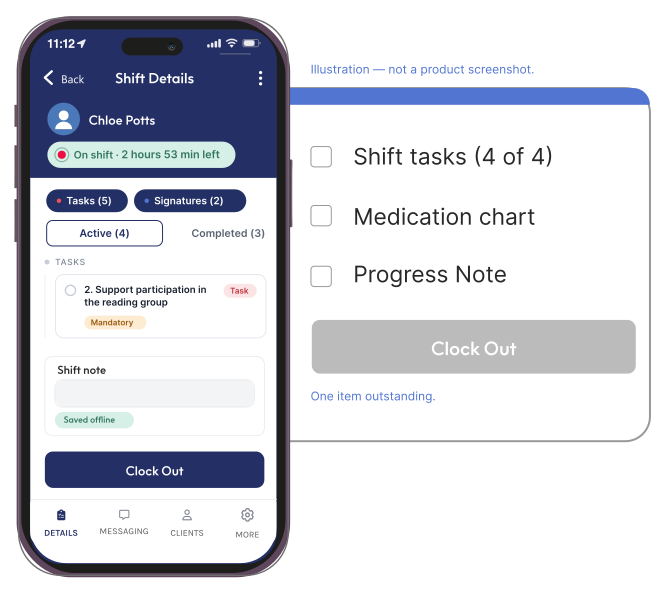
Mandatory, and the shift is still open. The worker sees what's outstanding while there's still time to do it, not the next morning.
Is it safe to let AI read care notes?
Yes. Participant data stays in your system. The Smart Note Coach checks a note against the care plan and does nothing else with it.
For more on how ShiftCare uses AI across the platform, see AI and automation.
AI features sit behind an admin-only master toggle plus a switch for each feature. Turn the master off and everything stops.
The coach asks questions. The worker answers them and owns the note. Nothing is added to a participant's record by AI without the person who delivered the support putting it there.
That's disabled by default and cannot be enabled. Retention is set to none with our model provider.
AI processing runs on AWS Bedrock inside ShiftCare's own AWS accounts. Your notes are not handed to an external AI provider. For Australian accounts that processing runs in Australia, and Australian customer data, including backups, is stored in Australian data centres.
Data is encrypted at rest and in transit, administrator actions are audited, and ShiftCare commissions external penetration testing and a white-box code audit annually.
What ShiftCare won't do with your progress notes.
Our AI model will never assume information about the NDIS and aged care services you deliver.
The Smart Note Coach asks about what's missing. It never fabricates clinical content, and a note is always written by the person who delivered the support.
ShiftCare records what happened and can require it before clock-out. Whether a note is adequate for your audit is a judgement your organisation makes.
A progress note describing an incident does not discharge your obligations under the Incident Management and Reportable Incidents Rules 2018. Incidents are their own record with their own timeframes.
Documenting a support and claiming for it are separate steps.
Retention obligations run seven years. Your exit plan is your own.
Frequently asked questions
Are progress notes mandatory for NDIS providers?
No provision of the NDIS Act uses the words “progress note”. The obligation is layered: the Practice Standards require each participant's information to be accurately recorded and kept current and timely, and providers must keep complete and accurate records of supports delivered to support payment claims. In practice a contemporaneous note is how providers meet both.
How long do progress notes need to be kept?
From 27 August 2026, records relating to payment and receipt of NDIS funds must be retained for seven years, with a civil penalty for failing to. A note supporting a claim falls inside that. Notes describing an incident also become part of the incident record, which carries its own retention. Seven years from the date of the note is the practical floor.
Does the 90-day claiming change affect progress notes?
Yes. From 1 December 2026 the window to claim for a support under a participant's plan reduces from two years to 90 days. A shift that hasn't been documented is a shift that hasn't been claimed, and there is no longer two years of room to catch up. Note timeliness became a revenue question, not only a compliance one.
Can I stop a support worker clocking out until their note is done?
Yes, if you turn it on. With mandatory notes, tasks and forms enabled, the shift can't be clocked out until they're complete. It's an account setting, so the standard is one your organisation sets rather than one imposed on it.
Can a support worker dictate a note instead of typing it?
Yes. Speak into the phone and the note is transcribed. Most workers who would type three lines will say considerably more, which produces a better record of the shift.
Does the AI write the note for the support worker?
No, and it's built not to. The Smart Note Coach reads what the worker wrote and asks about what's missing against that participant's care plan. It never invents clinical content. You won't get any observation, behaviour or outcome that the worker didn't describe. The worker answers in their own words and the note stays theirs.
What does the note coach check the note against?
That participant's care plan. Rather than generic prompts, it asks whether the note evidences the supports this particular person is funded for. That's what makes the questions worth answering. They're about the person in front of the worker, not a template.
What's the difference between a progress note and an incident report?
A progress note records what happened on a shift. An incident report records something that requires a response, and it carries obligations a note does not, including notification timeframes under the Incident Management and Reportable Incidents Rules 2018. Describing an incident in a progress note does not discharge those obligations. Raise the incident.
Who can see a progress note?
Access follows the participant and your account's permissions. The people supporting that participant, and the administrators who oversee the record. Notes can also be marked private so a sensitive entry is restricted rather than visible to everyone rostered.
Are our care notes used to train AI models?
No. Training on customer data is disabled by default and cannot be enabled, and retention is set to none with our model provider.
Can photos and files be attached to a progress note?
Yes, images, PDFs, Word documents and email files can be attached to a note, which is how a signed form or a photograph of a completed paper record ends up in the participant's file rather than on someone's phone.
What happens to a participant's notes if a support worker leaves?
The notes belong to the participant's record, not the worker's account. They stay in the file with their original author and timestamp regardless of whether that person still works for you, which is what retention obligations require.
Run ShiftCare on a real shift.
Start a free trial and see how Smart Note Coach can strengthen your progress notes. Seven days, no credit card, starting from $8 per user a month.