The Essentials of NDIS Mandatory Reporting: What Every Provider Needs to Know

Incident reporting plays an indispensable role in ensuring participant safety. It’s also obligatory for registered NDIS providers. Here’s what you need to know to stay compliant and protect clients.
What Is NDIS Mandatory Reporting?
Working with the NDIS means adhering to an extensive set of regulations, all of which are designed to protect NDIS participants’ safety and wellbeing. Mandatory reporting is one of them.
The National Disability Insurance Scheme requires all registered NDIS providers to notify the NDIS Commission of any “reportable incidents”, i.e. incidents that represent a major threat to participant safety, that occur in connection with the provision of NDIS supports or services.
Which Incidents Need Reporting?
Reportable incidents are:
- Death of an NDIS participant
- Serious injury of an NDIS participant
- Abuse or neglect of an NDIS participant
- Unlawful sexual or physical contact with an NDIS participant, or sexual or physical assault of an NDIS participant
- Sexual misconduct committed against an NDIS participant or in their presence, including grooming of the NDIS participant for sexual activity
- Unauthorised use of a restrictive practice (i.e. it’s not in accordance with a required state or territory authorisation and/or a behaviour support plan)
NDIS mandatory reporting isn’t just for proven incidents. You also need to inform the NDIS Commission of any alleged incidents — even if you’ve already investigated them and found them to be false.
And, you may have to report incidents to other authorities, such as the police. This is independent of your reporting obligations to the NDIS Commission.
NDIS Mandatory Reporting & the Code of Conduct
Only registered NDIS providers have to report incidents to the NDIS Commission. However, all providers, no matter their registration status, have a responsibility to take action after serious incidents.
The NDIS Code of Conduct states that disability support providers must promptly “take steps to raise and act on concerns about matters that might have an impact on the quality and safety of supports provided to people with disability”, in addition to taking “all reasonable steps” to prevent and respond to “all forms of violence, exploitation, neglect, and abuse of people with disability” as well as “sexual misconduct”.
This should include proactive risk management policies and a system for reporting and investigating incidents.
How Long Do You Have to Report Incidents to the NDIS?
You have 24 hours to report most incidents. The only exception is for incidents of unauthorised use of restrictive restraints, in which case you have up to five working days to report them.
However, this is assuming that the use of restrictive restraints does not harm the participant. If the practice causes immediate harm, you’ll also need to report the incident within 24 hours.
This deadline of 24 hours or five working days does not start the moment the incident or alleged incident occurs. Instead, it begins the moment that key personnel are made aware of what’s happened.
As such, you must know who in your business is considered key personnel. You should also have a well-designed, efficient internal procedure for reporting incidents.
Make sure support workers and caregivers know how to report incidents to supervisors so that you can react quickly.
How to Report Incidents to the NDIS
Once you’ve been alerted to a reportable incident or an allegation of one, go to the My Reportable Incidents page via the NDIS Commission Portal.
On this page, you’ll find links to an Immediate Notification Form, for incidents with a 24-hour notification period, and a Five Day Form. Filling in these forms can be a lengthy process: they will ask about what happened in the reportable incident, the actions you’ve taken in response and the individuals involved.
The NDIS recommends that the form is filled in by your Authorised Reportable Incidents Approver with the help of the Authorised Reportable Incidents Notifier. While both people can create and save new reports, only the Authorised Reportable Incidents Approver can review and submit them.
Depending on the incident, the NDIS Commission may email you to request a final report. This will also need to be submitted via the NDIS Commission Portal.
What Happens if You Can’t Meet Your Incident Reporting Deadline?
If IT issues are preventing you from reporting an incident on time via the NDIS Commission Portal, you must take all reasonable steps to resolve them. This includes calling the NDIS Commission for support.
Should the Commission be unavailable, you have to email the Reportable Incidents team in your state or territory or, if more relevant, the National Unauthorised Restrictive Practices team.
This email should detail both the reportable incident and the problems you’re having with notifying the NDIS Commission. This includes the attempts you’ve made to first rectify the issue and then contact the Commission.
What Should You Include in an NDIS Incident Report?
Whether you’re filling in an Immediate Notification Form, Five Day Form or Final Report, the form will explain everything you need to include.
You can expect to be asked for:
- The names and NDIS numbers of the people involved
- Contact details for any witnesses
- What happened
- When and where the incident happened
- Your immediate response
- Steps taken to ensure the participant’s safety
- Steps you plan to take, e.g. updated risk assessment
- Whether other authorities have been notified
The more information you have from your frontline staff, the easier it will be to create a detailed and accurate incident report. Our guide to incident reports will walk you through creating a disability reporting template for your caregivers.
5 Essential Steps to a Compliant Incident Reporting System
- Create Your Incident Management Process
Your team needs to know exactly what to do following a reportable incident. This includes how to record and report the incident, who to report it to, and how to follow up.
Use your NDIS software to store, manage and review incident reports, and make sure all team members are aware of their responsibilities and deadlines.
- Build Incident Management Forms
Our guide to writing incident reports will help your support workers write better reports. But no matter how well you train your team, there’s always the risk of important details being left out.
The NDIS Commission’s mandatory reporting process requires extremely thorough and accurate information. That’s why incident management forms and templates are essential.
ShiftCare’s disability management software comes with built-in incident forms to keep your agency compliant. You can customise them for different types of incidents and clients.
- Test Your System
Go through your system step by step to check that everything works as designed. Is there anything that could go wrong? How can you avoid that?
- Train Your Staff
Regular training will ensure your support workers and admin team alike feel confident with the incident management process.
- Review Your System
Schedule an annual review to check the system still functions correctly. This will help you avoid issues such as key personnel having changed or custom incident form templates being outdated.
Where to Send NDIS Incident Reports
Submit NDIS incident reports on the My Reportable Incidents page of the NDIS Commission Portal.
NDIS Incident Reporting Software That Keeps You Compliant
ShiftCare’s NDIS software comes with customisable incident management forms so that if an incident occurs, your staff can swiftly and securely report it. You’ll have all the information you need to respond appropriately, provide adequate aftercare for clients and notify the NDIS.
What are NDIS reportable incidents?
NDIS reportable incidents are proven or alleged incidents resulting in serious harm to a participant in connection with disability services provision.
Powerful Record-Keeping Tools for NDIS Providers
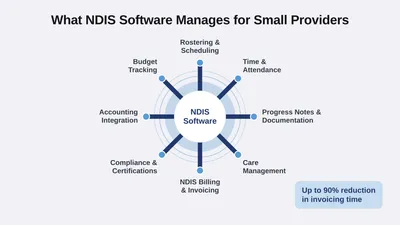
Record-keeping is fundamental to the safety and wellbeing of NDIS participants. ShiftCare’s NDIS software makes documentation easy, with on-the-go progress notes, voice-to-text records, document templates, geolocation service delivery verification, client signatures on service delivery, message logs and more. Try ShiftCare for free.
NDIS FAQ
1. What is NDIS mandatory reporting, and why is it important for providers?
NDIS mandatory reporting requires providers to report incidents like abuse, neglect, or harm involving participants. It ensures accountability, compliance with NDIS standards, and protection of participant rights.
2. How can ShiftCare help NDIS providers manage mandatory reporting requirements?
ShiftCare offers tools like incident management features and customisable templates to streamline the reporting process. These features help providers document, track, and monitor incidents efficiently, ensuring compliance with NDIS regulations.
3. What are the consequences of failing to comply with NDIS mandatory reporting?
Non-compliance can lead to penalties, loss of NDIS registration, and reputational damage. Using tools like ShiftCare’s compliance features helps providers stay on top of reporting obligations and maintain their registration.