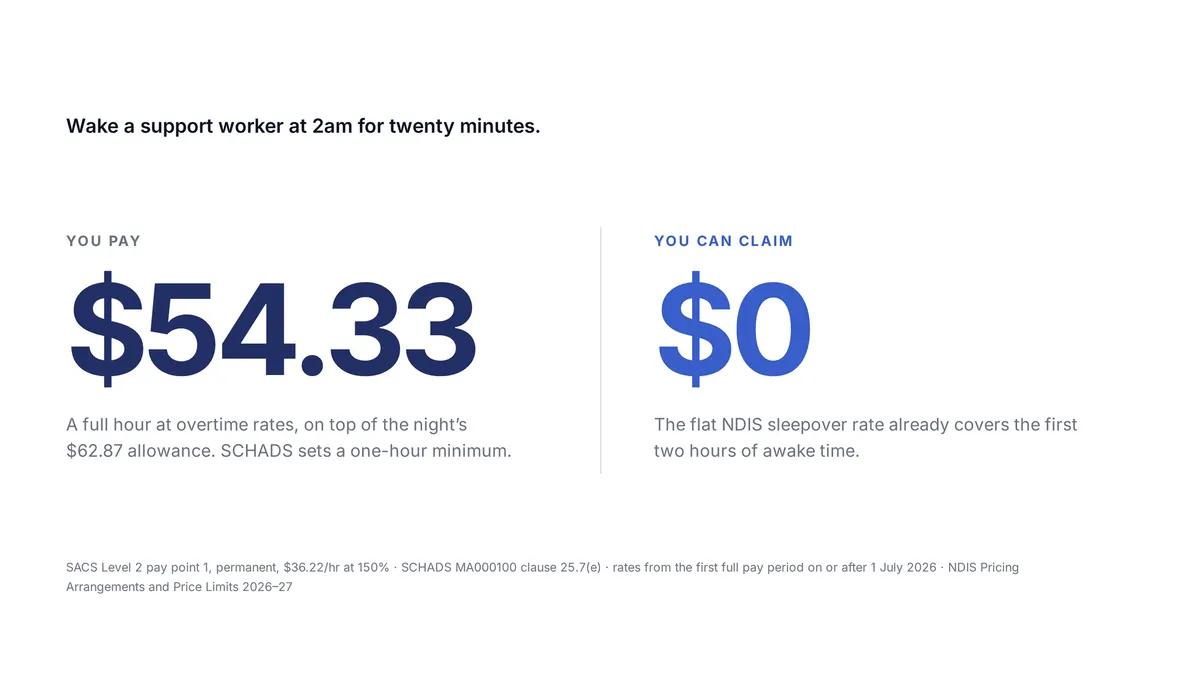
A sleepover shift is an overnight period where a support worker sleeps at the workplace and is available if needed. They’re paid a flat allowance for the sleepover itself. If they’re woken to work, that time is paid separately at overtime rates — under SCHADS clause 25.7(e), with a minimum payment of one hour. The allowance and the awake time are two different things, calculated two different ways.
The Two-Hour Mismatch That Costs Providers Money
Here’s the thing almost nobody has straight.
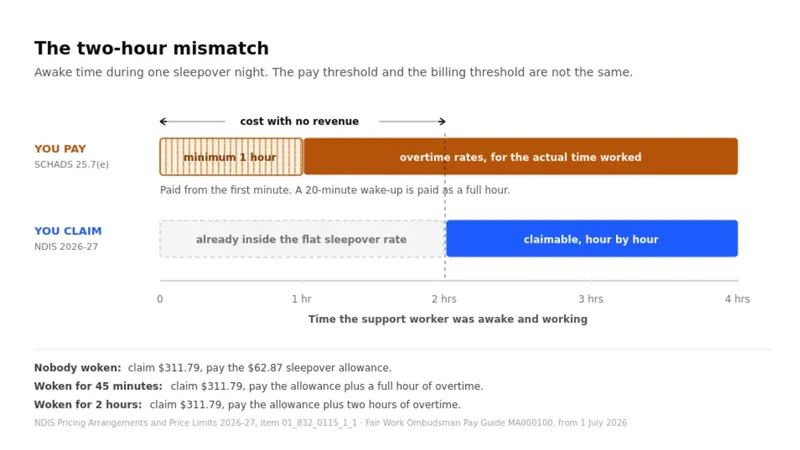
The NDIS includes the first two hours of active support in the flat sleepover price. Wake the worker for 90 minutes and you claim nothing extra.
SCHADS makes you pay from the first minute, with a one-hour minimum. Wake the worker for 20 minutes and you owe a full hour at overtime rates.
The two thresholds don’t line up. Between zero and two hours of awake time, every minute is cost with no matching revenue, and the squeeze is worst at exactly two hours, where you’ve absorbed the maximum unfunded cost right before the billing threshold opens.
What One Night Actually Looks Like
Standard geographic area. Permanent SACS Level 2, pay point 1. Weeknight sleepover.
| Awake time | You can claim | You must pay | Left over |
|---|---|---|---|
| None | $311.79 | $62.87 | $248.92 |
| 45 minutes | $311.79 | $117.20 | $194.59 |
| 2 hours | $311.79 | $171.53 | $140.26 |
Past two hours the excess becomes claimable and the position starts to recover, but every minute up to that point is carried by the provider.
The inputs, so you can check the arithmetic:
| Input | Value | Source |
|---|---|---|
| NDIS night-time sleepover, flat — item 01_832_0115_1_1 | $311.79 per night, standard geographic area. Remote $436.51, very remote $467.69 | NDIS Pricing Arrangements and Price Limits 2026-27, effective 1 July 2026 |
| Active support included in that flat rate | Up to 2 hours | NDIS Pricing Arrangements and Price Limits 2026-27 |
| SCHADS sleepover allowance | $62.87 per night — 4.9% of the standard rate, clause 25.7(d) | Fair Work Ombudsman Pay Guide MA000100, from the first full pay period on or after 1 July 2026 |
| SACS Level 2 pay point 1, permanent | $36.22 per hour | Fair Work Ombudsman Pay Guide MA000100, from 1 July 2026 |
| Overtime during a sleepover | 150% for the first two hours, 200% thereafter, minimum one hour | SCHADS clause 25.7(e), read with clause 28 |
Beyond two hours, the rate follows the day the awake period fell on, and the overtime you pay rises on the same days — 200% on a Sunday, 250% on a public holiday.
Sleepovers in a SIL House
Most sleepovers aren’t one worker and one participant. They’re one worker and a house.
In a Supported Independent Living home, a single overnight worker covers two, three or four residents. That changes the arithmetic in ways the one-to-one version doesn’t prepare you for.
Each resident has their own two-hour threshold. The NDIS includes up to two hours of active support in each participant’s sleepover. So on the same night, one resident can go past two hours and generate a claim while the others generate nothing — from one worker, on one shift. Awake time has to be attributed to the person it was for, or the billing is wrong for everybody in the house.
Overlapping time is paid once. If the worker is up between 2:00 and 2:40 dealing with two residents, that’s 40 minutes of overtime for the worker — not 80. But it’s 40 minutes against each of those two participants for the purposes of their own thresholds.
The house roster is the unit, not the shift. A SIL roster is built as a pattern for the whole house — who’s on, at what ratio, across a typical week. Sleepovers and active overnight shifts are rostered separately in that pattern, because they’re funded separately.
This is also where the evidence question bites hardest. A SIL house that keeps waking its overnight worker is a house whose support model may no longer match its funding — and the NDIS Quality and Safeguards Commission’s guidance is that where a participant needs more than two hours of support most nights, providers should contact the NDIA about converting to active night supports.
On the roster of care. As of the NDIA’s June 2026 guidance, the roster of care is no longer a requirement and providers don’t submit it directly. It goes to the participant and their support coordinator to be included in a home and living supports request or a plan reassessment. Which makes what sits behind it more important, not less: a per-participant record of how often the worker was woken, for how long, and to do what.
Do You Have to Review Every Sleepover Shift?
This is the part providers tell us about, and it isn’t the rostering.
Somebody has to open each sleepover shift, read the note, work out whether the worker was up in the night, decide whether what’s described justifies a claim, and work out the times. Then go into the timesheet and change the pay treatment. Then check the invoice carries the right amount.
Every sleepover, every week. Most turn out to be nothing.
The reading is unavoidable — the note is the only record of what happened at 2am. Who does the first read is not.
What Counts as Awake Time?
Any task the support worker got up and performed for the participant: toileting, continence or pad changes, repositioning, personal care, PEG or scheduled feeds, medication, responding to a seizure or medical event, settling distress or a behavioural episode, or a welfare check where they physically got up to check.
If the worker did work, it counts — including a scheduled feed done while the participant stayed asleep. An entry isn’t discounted because the participant “didn’t need” it.
What the Award Says
SCHADS (MA000100) clause 25.7(c), on the sleepover itself:
“The span for a sleepover will be a continuous period of 8 hours. Employees will be provided with a separate room with a bed and clean linen, the use of appropriate facilities (including access to food preparation facilities and staff facilities where these exist) and free board and lodging for each night when the employee sleeps over.”
Clause 25.7(e), on being woken:
“In the event of the employee on sleepover being required to perform work during the sleepover period, the employee will be paid for the time worked at the prescribed overtime rate with a minimum payment as for one hour worked. Where such work exceeds one hour, payment will be made at the prescribed overtime rate for the duration of the work.”
Source: Fair Work Commission, MA000100 clauses 25.7(c) and 25.7(e).
Three things that follow, and are routinely missed:
- A 20-minute wake-up is paid as one hour. The minimum payment isn’t pro-rata.
- It’s overtime, not ordinary time — so it’s excluded from ordinary time earnings for superannuation purposes.
- It sits outside the 38-hour week. Awake time doesn’t count toward standard weekly hours.
And clause 25.7(f), which catches people rostering around the sleepover: you may roster work immediately before and/or after, but you must roster or pay at least four hours’ work for at least one of those periods.
How to Roster a Sleepover
Split the night into its parts, and put the sleepover allowance only on the sleeping portion.
| Shift | Time | Treatment |
|---|---|---|
| 1 | 5:00pm to 10:00pm | Standard face-to-face support |
| 2 | 10:00pm to 6:00am | Sleepover allowance here; “shift finishes the next day” ticked |
| 3 | 6:00am to 9:00am | Standard face-to-face support |
Rostered as one continuous 16-hour block, payroll can’t tell which hours were active support and which were the sleepover, so the allowance lands on the wrong hours or doesn’t land at all.
The sleepover itself is one shift, not two. It runs 10:00pm to 6:00am as a single shift crossing midnight — set the shift type to Sleepover, or tick “shift finishes the next day”, and ShiftCare dates the end correctly. You don’t split it at midnight.
Apply Sleepover does the setup: tick “shift finishes the next day” or select the sleepover allowance and a banner appears in the shift drawer. One click sets the shift type, the next-day flag and the allowances, and surfaces the participant’s awake time rate.
Then stop making the worker clock in and out all night. Turn on auto clock in/out for sleepover shifts in Account > Settings > Time and Attendance, and the worker clocks in once when they arrive and out once when they leave. ShiftCare clocks the connecting shifts at their scheduled times. Six clock actions across the night becomes two — at 5pm and at 9am — with nobody setting an alarm for 5:59am to press a button.
Three rules that come with it:
- The first clock-in is the control. Miss it and nothing auto-clocks — the manual clock-in is what confirms the worker actually arrived. Where your account has the clock-in location check enabled, that’s also where their location is checked against the shift address.
- Real times always win. If the worker’s actual times differ from the roster, they record them and the manual time overrides the auto-clocked one and locks it in.
- The final clock-out gates the block. Mandatory tasks, notes and forms have to be complete before the worker can close the night out, and only then does the block process for approval.
How ShiftCare Handles the Awake Time
It gets recorded two ways. The support worker logs it on the shift in the app — from, until, and a short note answering “what care did you provide?” Or ShiftCare reads the progress notes at clock-out: “client woke around 2am, helped to the toilet, back to sleep by 2:45” becomes a pending entry for 2:00am to 2:45am.
It gets checked. Each entry carries a confidence score and a recommendation — is this a genuine awake period, and does the note account for the time claimed? An hour logged against “woke at 2am distressed, toileted, changed bedding, resettled by 3am” scores high. Three hours logged against “took client to toilet at 1am” scores low and comes to a person.
This isn’t about catching anyone out. It reconciles a claim against the note that accompanies it, and a person decides.
Then one approval settles both sides of the shift.
| What happens | |
|---|---|
| Pay | An awake time allowance lands on the worker’s timesheet with the overtime treatment awake time attracts. Nobody opens a timesheet to change a rate. |
| Billing | The chargeable portion is calculated against the two-hour threshold and appears on the invoice as its own line, at that participant’s awake time rate. |
Two rounds of manual work gone from one decision: reading every note to find the awake periods, then going shift by shift to correct a pay rate and invoice by invoice to correct a charge.
You choose how much reaches you. In Account > AI Settings, the sleepover agent is off until you turn it on. Leave it off and every entry waits for a person. Or set it to high confidence only (the recommended setting) and only the clear ones approve themselves.
See how SCHADS rostering in ShiftCare handles award rules, or compare plans on the pricing page.
Why This Matters More Than the Admin Time
The support worker’s pay. Somebody was up at 2am doing continence care. Under SCHADS that’s overtime with a one-hour minimum. If nobody reads the note, they’re paid the allowance and nothing else — an underpayment nobody notices, carried by the worker.
The organisation. An underpayment found later is a back-pay calculation and an award compliance problem. An overcharge found later is a repayment to a participant’s plan. Both are cheap to avoid when the note is written and expensive when somebody audits it.
The participant’s funding. Where someone needs more than two hours of support most nights, that’s a conversation with the NDIA about active night supports — and it needs evidence, not recollection. The same record supports a home and living supports request or a plan reassessment. The sleepover report holds it for any date range, broken down by worker, participant, duration, status and source: whether a person logged it or it came from the notes. That last field is what an auditor asks for.
What This Doesn’t Do
- It doesn’t decide anything unless you let it. Auto-approval is off by default.
- It won’t always find the awake period. If the note doesn’t describe the night, there’s nothing to detect — add it manually, or the worker logs it in the app.
- It doesn’t score old entries. Awake time already in your account before scoring was switched on stays unscored. There’s no backfill.
- It doesn’t train on your data. Your notes are not used to train AI models, and retention is set to none with our model provider.
- It doesn’t hide its work. Every awake time entry records its source — logged by a person, or detected from the notes — in both the sleepover review and the sleepover report. That’s the audit trail NDIS and CQC ask for.
- It doesn’t roster a sleepover as a single shift. Today that’s two or three shifts with the allowance on the sleeping portion.
Is It Safe to Let AI Read Care Notes?
A fair question, and the answer should be specific rather than reassuring.
You decide whether it runs at all. AI features sit behind an admin-only master toggle plus a switch for each individual feature. Turn the master off and everything stops. The sleepover agent’s auto-approval is off until you turn it on, and defaults to the highest confidence setting when you do.
A person still decides. The AI reads, scores and recommends. Approving an entry pays a support worker and bills a participant, so unless you have explicitly chosen otherwise, that decision stays with a human.
Every entry says where it came from. The sleepover review and the sleepover report both record whether an awake period was logged by a person or detected from the notes. Provenance is part of the record, not something reconstructed afterwards.
Your notes aren’t used to train models, and retention is set to none with our model provider.
Where the processing happens. AI processing runs on AWS Bedrock inside ShiftCare’s own AWS accounts — your notes are never handed to an external AI provider. For Australian accounts that processing runs in Australia, and Australian customer data, including backups, is stored in Australian data centres.
The rest of the posture. Data is encrypted at rest and in transit, administrator actions are audited, and ShiftCare commissions external penetration testing and a white-box code audit annually.
Setting It Up
- Roster sleepovers as separate shifts with the allowance on the sleeping portion — or let Apply Sleepover do it
- Turn on auto clock in/out for sleepover shifts in Account > Settings
- Set an awake time rate for each participant who has sleepovers
- Map the awake time allowance to an overtime pay item, exempt from the superannuation guarantee
- In Account > AI Settings, choose your sleepover agent setting — off, or a confidence level you’re comfortable approving on
Every one of those is a setting in your own account. Availability: Australian NDIS accounts.
See it in ShiftCare.
7 days free on Premium. No credit card.
Frequently asked questions.
How do I roster a sleepover shift?
Split the night into two or three shifts and put the sleepover allowance only on the sleeping portion — typically an evening shift, the sleepover, then a morning shift. Rostered as one continuous block, payroll can’t separate the active hours from the sleepover, so the allowance attaches to the wrong hours or doesn’t apply at all.
Do I have to enter a sleepover as three separate shifts: 5pm to 10pm, 10pm to 6am, 6am to 9am?
Yes, that’s the structure that works. The evening and morning shifts are ordinary face-to-face support at their normal rates; the middle shift carries the sleepover allowance and the “finishes the next day” flag. Auto clock in/out removes most of the friction — the worker clocks in once on arrival and out once when they leave.
How do sleepovers work in a SIL house with more than one resident?
One worker covers the house, but each resident’s supports are funded individually — so each has their own two-hour threshold for awake time. On the same night one resident can pass two hours and generate a claim while the others don’t. Awake time has to be attributed to the participant it was actually for, or the billing is wrong for the whole house.
If one worker is woken for two residents at the same time, what do I pay and what can I claim?
You pay the worker once for that period — 40 minutes covering two residents is 40 minutes of overtime, not 80. For billing, that time counts against each of those participants separately, against each of their own two-hour thresholds. Pay is per worker; claims are per participant.
Do I still need a roster of care for a SIL participant?
As of the NDIA’s June 2026 guidance, the roster of care is no longer a requirement and isn’t submitted directly to the NDIA. It goes to the participant and their support coordinator, to be included in a home and living supports request or a plan reassessment. What supports it — the record of actual overnight support delivered — matters more than the template.
When should a SIL house move from sleepover to active night support?
The NDIS Quality and Safeguards Commission’s guidance is that where a participant needs more than two hours of support most nights, providers should contact the NDIA about converting to active night supports. The trigger is a pattern, not a single bad night — which is why a dated record of awake periods per participant is what the conversation rests on.
Does a sleepover shift have to be split at midnight?
No. A sleepover runs as a single shift from 10:00pm to 6:00am, crossing midnight. Setting the shift type to Sleepover — or ticking “shift finishes the next day” — dates the end on the following day for you. What still needs separating is the active support either side of the sleepover, because those hours are paid and billed differently.
Do support workers have to clock in and out of all three shifts?
Not with auto clock in/out for sleepover shifts turned on. The worker clocks in once when they arrive and out once when they leave, and ShiftCare clocks the connecting shifts at their scheduled times. The first clock-in is what confirms attendance — miss it and nothing auto-clocks — and any time the worker records manually overrides the automatic one.
What’s the difference between a sleepover and an active night shift?
In a sleepover the worker sleeps and is available if needed, paid a flat allowance plus overtime for any time worked. In an active night the worker is awake and working throughout, paid an hourly rate for every hour. The NDIS prices them separately: a flat sleepover rate per night, versus an hourly rate for active overnight support.
How much of a sleepover’s awake time is included before I can charge extra?
Two hours. Under the NDIS 2026-27 Pricing Arrangements the flat sleepover price covers up to two hours of active support. Only time beyond two hours is claimable, and the threshold applies per participant. Three hours awake means one chargeable hour; ninety minutes means nothing extra.
How much do you pay a support worker who’s woken during a sleepover?
At the prescribed overtime rate, with a minimum payment as for one hour worked, under SCHADS clause 25.7(e). A 20-minute wake-up is paid as a full hour. Where the work exceeds one hour, the overtime rate applies for the actual duration.
If a worker is woken for 90 minutes, what do I pay and what can I claim?
You pay 90 minutes at the overtime rate — above the one-hour minimum, so the actual duration applies. You claim nothing extra, because the first two hours of awake time are already inside the flat sleepover price. This gap between the pay threshold and the billing threshold is the most commonly missed part of sleepover costing.
Is the sleepover allowance paid on top of the hours, or instead of them?
It’s a flat allowance for the sleepover period, not an hourly rate — $62.87 per night from the first full pay period on or after 1 July 2026, being 4.9% of the standard rate under SCHADS clause 25.7(d). Any time actually worked during the sleepover is paid separately, at overtime rates, on top of the allowance.
Why does my timesheet show zero hours when I add a sleepover allowance?
Because the sleepover is recorded as a single allowance unit rather than as hours worked. That’s expected, not an error. Show the sleepover allowance column on the timesheet report to see it, and any awake time on the same shift appears in its own column with its own hours.
How do I set a different rate for awake time on a participant’s invoice?
Set a separate awake time rate against the participant, so ShiftCare knows what to charge when awake time goes past the two-hour threshold. Approved awake time then appears on the invoice as its own line rather than being folded into the support line, with the chargeable hours calculated for you.
Does awake time get billed at weekend or public holiday rates?
The rate follows the day the awake period fell on, so a Sunday or public holiday sleepover attracts a higher rate for any awake time beyond two hours — and the overtime you pay the support worker rises on those days too, to 200% on a Sunday and 250% on a public holiday under SCHADS. Check the applicable line item against the current NDIS Pricing Arrangements.
Do sleepover hours count towards a worker’s ordinary hours or overtime?
The sleepover itself isn’t ordinary hours — it’s covered by the allowance. Time worked during the sleepover is paid at overtime rates and sits outside the standard 38-hour weekly total, so it doesn’t push a worker into weekly overtime on its own.
Is superannuation payable on the sleepover allowance?
Superannuation is calculated on ordinary time earnings, and overtime is excluded from ordinary time earnings — which is why awake time paid at overtime rates isn’t superannuable. The treatment of the sleepover allowance itself depends on how it’s classified, so confirm it with your accountant or the ATO rather than assuming. Set the treatment once in your payroll and it applies consistently.
What changed for sleepovers in the SCHADS Award in 2026?
Following a Fair Work Commission Full Bench decision in December 2025, changes took effect from the first full pay period on or after 1 June 2026. The most operationally significant is that work performed immediately before and immediately after a sleepover is treated as a single continuous shift. Check the current award text at Fair Work before relying on any secondary summary.
Can I roster the same worker on a sleepover and then a day shift the next morning?
Yes, and clause 25.7(f) requires it in one direction: you must roster or pay at least four hours’ work for at least one of the periods immediately before or immediately after the sleepover. The rest depends on rest-break rules and the hours already worked that week.
How do I pay a worker who works until 11:30pm before a 10pm–6am sleepover starts?
The overrun is ordinary or overtime hours on the evening shift, not part of the sleepover — so roster the evening shift to its actual end and let the sleepover begin from there. Recording the real end time rather than the scheduled one is what keeps the allowance attached to the right hours.
When does a sleepover need to become an active night shift?
The NDIS Quality and Safeguards Commission’s guidance is that where a participant needs more than two hours of support most nights, providers should contact the NDIA about converting to active night supports. That’s a funding conversation, and it rests on evidence of how often the worker was woken and for how long.
What records do I need to prove awake time if the NDIS asks?
A record for each awake period showing which participant it related to, the start and end times, what care was provided, who approved it, and whether it was logged by the worker or drawn from the progress notes. ShiftCare’s sleepover report produces exactly that over any date range, which is also what supports a change-of-circumstances request.
How does AI find awake time in sleepover notes?
When the support worker clocks out, ShiftCare reads the progress notes they’ve already written, detects any awake period described, and creates a pending entry for that time window with a confidence score and a recommendation. Support workers can also log an awake period directly in the app during or after the shift.
Does approving awake time update pay and the invoice automatically?
Yes. One approval adds the awake time allowance to the support worker’s timesheet with the overtime treatment awake time attracts, and puts the chargeable portion on the participant’s invoice as its own line at the rate you’ve set. You don’t open a timesheet to change a rate or an invoice to correct a charge.
Does the AI approve awake time without a person?
Only if you turn auto-approval on, and it’s off by default. When it’s on you choose the level: high confidence only, which is recommended, medium and above, or all detections. Anything below your setting waits for a person to approve, adjust or reject.
What if the detected times are wrong, or a period was missed?
Open the entry in the sleepover review and adjust the start and end times, or add an awake period the notes didn’t capture. You can reject an entry with a reason, or undo anything back to pending. The record keeps who changed what.
How does a sleepover covering two participants work?
Each awake period is attributed to the participant it relates to — the support worker selects who they were woken for, and it can be changed on review. Billing follows that attribution, with a separate two-hour threshold for each participant. Pay totals across the shift, counting overlapping time once.
Do I get paid extra if I’m woken up during a sleepover?
Yes. Under SCHADS clause 25.7(e), work performed during a sleepover is paid at the prescribed overtime rate with a minimum payment as for one hour worked — so even a short disturbance is paid as an hour. That’s separate from, and on top of, the sleepover allowance for the night. Fair Work publishes the current rates.
How do I check what awake time was recorded for my shift?
Awake time you log in the app stays visible against the shift, showing the times recorded and whether it’s still pending or has been approved. If the times don’t match what happened, raise it with your coordinator — entries can be adjusted before they’re approved, and the change is recorded.
Can rostering software work out sleepover pay and awake time automatically?
It can capture the awake period, check it against the shift notes, apply the overtime treatment to the worker’s timesheet and put the chargeable portion on the participant’s invoice — from one approval. What it can’t do is invent a record that was never written, which is why the progress note still matters.
Is it safe to let AI read care notes?
You control whether it runs: an admin-only master toggle plus a switch per feature, and auto-approval off until you enable it. A person approves anything that affects pay or billing unless you choose otherwise. Every awake time entry records whether a person logged it or it came from the notes, which is the provenance an audit asks for.
Is my data used to train AI models?
No. Your notes are not used to train AI models, and retention is set to none with our model provider.
Where is my data processed when AI reads a note?
AI processing runs on AWS Bedrock inside ShiftCare’s own AWS accounts — notes are never handed to an external AI provider. For Australian accounts that processing runs in Australia, and Australian customer data, including backups, is stored in Australian data centres.