ShiftCare vs SETWorks
SETWorks will help you schedule client disability services, but how does it compare to our disability software, ShiftCare?
Join the 8,000+ agencies using ShiftCare globally
Subscriptions start at just $9 user / month.
A Disability Software Showdown
Here at ShiftCare, we like to think that our care management software is pretty impressive. But, we also know that there’s no one-size-fits-all software solution.
The right choice of software comes down to one simple question: which platform will best meet your business needs?
That’s why we’re putting SETWorks and ShiftCare under the microscope. Features, pricing, and customer support: get ready to learn what sets these two platforms apart.
What Is SETWorks?
SETWorks is a disability service software platform. It helps agencies manage their client services, including at-home care, residential care, and day programs.
Agencies can use SETWorks to schedule client services or outings, allocate staff to those services, and track staff time. You can also update and sign off on client documentation, as well as generate invoices and automate reports.
Plus, SETWorks can help agencies monitor work opportunities for their clients, including creating a job database and employer profiles.

What Is ShiftCare?
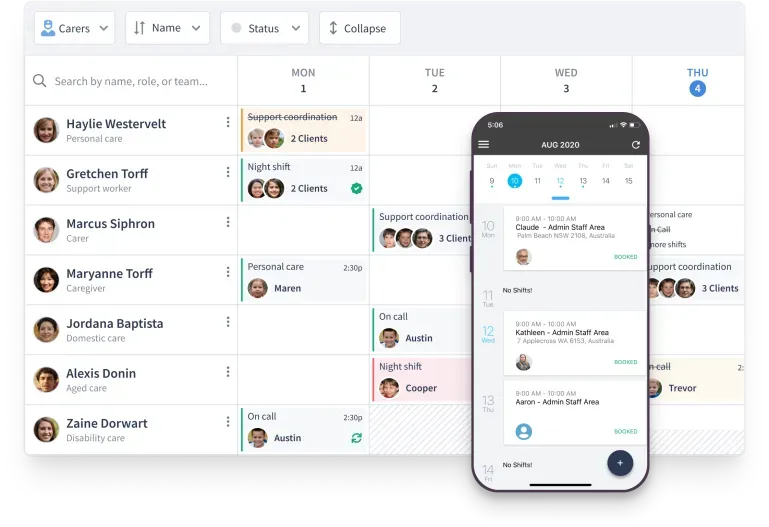
ShiftCare is care management software built around the needs of home care and home health agencies, assisted living facilities, and regional centers. Key features include scheduling, document management, time tracking, invoice generation, and client management.
ShiftCare stands out for its:
-
Powerful scheduling tools
Save time scheduling with recurring and team rosters. You can switch between client and caregiver schedules, as well as use staff filters and drag-and-drop technology. Your caregivers can set their availability in the app and bid on available shifts, meaning you won’t have to manually manage vacation requests or find last-minute shift coverage.
-
Companion apps
ShiftCare doesn’t just support you; it supports everybody involved in the caregiving process. Your caregivers can use the mobile app to check their schedules, view shift details, and add client care notes. And, you can invite clients, their loved ones, and their informal caregivers to get care updates via the ShiftCare Connect web portal.
-
Transparent pricing plans
You’ll always know exactly how much you’re paying with ShiftCare. Full details of the tiered subscription plans are published online. With rolling monthly contracts, it’s easy to upgrade or downgrade your plan based on the features you need. And, there are no hidden fees.
What Are the Differences?
| Feature | SETWorks | ShiftCare |
|---|---|---|
| Region | USA | US, Canada, Australia |
| Monthly Price | Available on request | From $8/user |
| Minimum Contract Length | Available on request | One month |
| Free Trial | ||
| Free Demo | ||
| Free Onboarding | Free self-onboarding; paid packages also available | |
| Service Scheduling | ||
| Caregiver Shift Bidding | ||
| Document Management | ||
| Incident Reporting | ||
| Client Budget Management | ||
| Client Goals Tracking | ||
| Electronic Visit Verification | ||
| Real-Time No-Show Alerts | ||
| Client Digital Signatures | ||
| Employment Services Management | ||
| Billing, Accounting, & Payroll Integrations | ||
| Invoice Generation | ||
| In-App Billing | ||
| Automated Reporting | ||
| Secure Cloud Storage | ||
| Live Customer Support chat | ||
| Mobile Caregiver App | ||
| Portal for Patients and Their Loved Ones |
Disclaimer: This comparison is based on publicly available information and customer feedback as of September, 2024. All comparative statements are intended to be truthful, accurate, and evidence-based. ShiftCare has no affiliation with or endorsement from SETWorks. Their name is used strictly for comparative purposes. If you represent SETWorks and believe any information presented here is inaccurate or misleading, please contact us, we’re open to feedback and will review any substantiated concerns.
For a detailed overview of ShiftCare plans and pricing, please see our pricing page.
SETWorks vs ShiftCare: Which Is Best?
Both SETWorks and ShiftCare will help you manage your clients’ disability care, from scheduling their services to updating documentation and reporting incidents. However, there are several big differences between the two platforms.
SETWorks has tools for supporting your clients in accessing the labor market. You’ll be able to build an employer database and track work placements so you can advocate for your clients. And, it comes with in-app billing and EVV.
With ShiftCare, you can auto-generate invoices and monitor time and attendance. However, you cannot directly bill clients or do EVV within the app. Instead, you’ll need to integrate your billing software with ShiftCare.
On the other hand, ShiftCare comes with a mobile app for your care staff so they’re supported on the go, plus a client-facing portal so you can share care updates with your clients and their loved ones.
ShiftCare offers additional workforce management features including team schedules, shift bidding, caregiver time-off management, and real-time no-show alerts. And with a live customer support chat, you’ll always get the help you need to make the most of ShiftCare’s features.
Whether you’re switching software providers or signing up for the first time, getting started with ShiftCare is easy. There’s a complementary training session as well as several onboarding packages for you to choose from.

FAQs
What is SETWorks used for?
SETWorks is disability services software that helps providers manage client scheduling, documentation, billing, reporting, and employment services for people with intellectual and developmental disabilities (IDD).
Who uses SETWorks?
SETWorks is used by disability service providers, HCBS organizations, residential care providers, and agencies that support people with intellectual and developmental disabilities.
Does SETWorks support Electronic Visit Verification (EVV)?
Yes, SETWorks includes Electronic Visit Verification (EVV) to help agencies verify service delivery and meet Medicaid requirements.
Does SETWorks have a mobile app?
SETWorks offers mobile tools that allow staff to access schedules, complete documentation, and manage services while working in the community.
Does SETWorks support employment services?
Yes, SETWorks includes employment services features, allowing agencies to manage employer records, job placements, and vocational support programs.
Is SETWorks good for HCBS providers?
SETWorks is designed to support HCBS and disability service organizations with scheduling, documentation, reporting, and compliance workflows. Providers should compare its features with their operational requirements before choosing a platform.
Does ShiftCare include a family portal?
Yes, ShiftCare includes a Friends & Family portal that allows approved family members and caregivers to stay informed about care updates and participant information.
Can ShiftCare help fill open shifts faster?
Yes, ShiftCare includes features such as shift bidding, SmartMatch, and real-time workforce management to help agencies find available caregivers more efficiently.
Does ShiftCare support AI-powered care management?
Yes, ShiftCare includes AI-powered tools that help with care documentation, workforce scheduling, and operational workflows, reducing administrative effort for care teams.
What should I compare when choosing disability software?
Look beyond scheduling by comparing documentation, EVV support, care planning, reporting, workforce management, integrations, customer support, AI capabilities, and scalability to find the platform that best fits your organization.