ShiftCare vs. When I Work
When I Work will help you schedule your team. But how does it compare to our care management software, ShiftCare?
Join the 8,000+ agencies using ShiftCare globally
Subscriptions start at just $9 user / month.
A Workforce Management Software Showdown
The right workforce management software won’t just help you fill shifts. It will also save you time, improve service quality, and increase caregiver morale.
But not all workforce management software options have the same features. That’s why we’ve done a detailed side-by-side comparison of When I Work and ShiftCare.
What Is When I Work?
When I Work is a budget employee scheduling app used across a wide range of industries. It can be used to schedule staff, track time and attendance, message team members, and process payroll.
The app has a tiered pricing model, with bare-bones subscriptions starting from $1.50/user per month and additional features costing extra.
However, add-ons can cost significantly more than the original subscription. Payroll processing, for example, is $6/user plus $39 per month. Other premium features include advance schedules, scheduling conflict notifications, and preventing staff from viewing all other employees.
What Is ShiftCare?
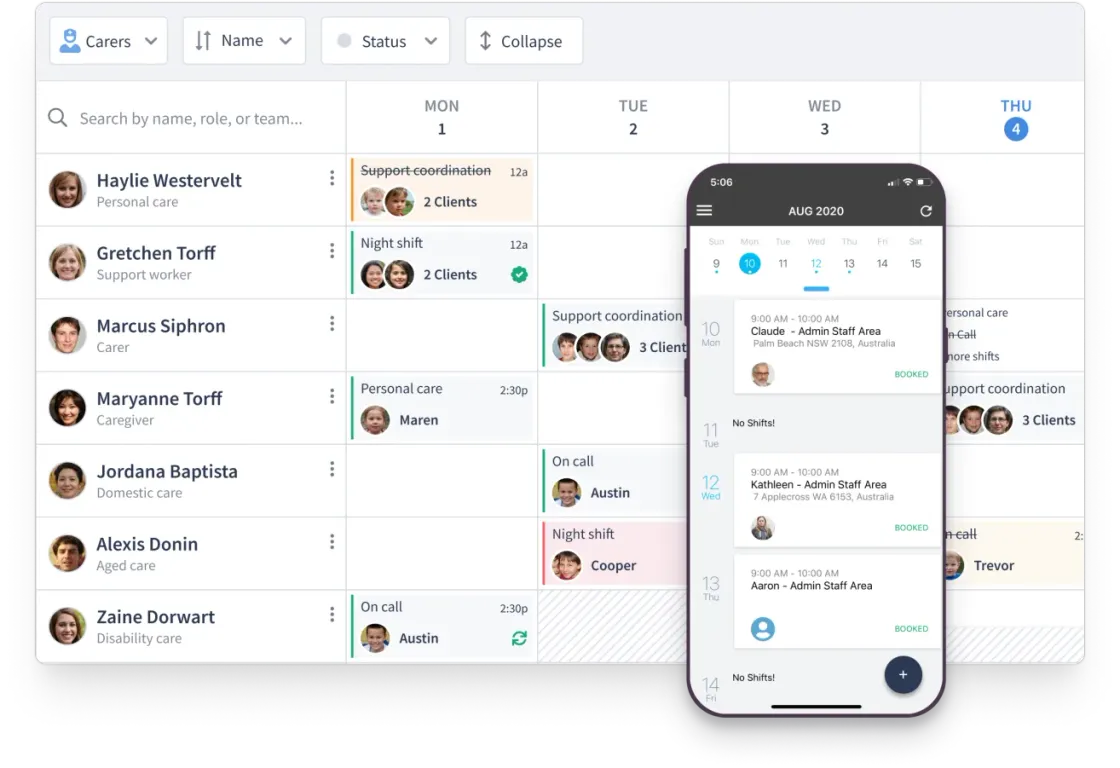
ShiftCare is a care management software designed to support home care agencies, assisted living facilities, and regional centers. It helps you automate scheduling, track time and attendance, manage patient documentation and care plans, generate invoices, and communicate with caregivers and clients alike.
It maintains a 4.7/5 rating on independent review sites thanks to its:
-
Patient management features
You can upload care plans, set patient goals and strategies, manage client funding, and even share updates with patients’ loved ones from within the app.
-
Care notes
Your caregivers, nurses, and specialists can record and upload care notes on the go so you have a secure digital record. Either use the default care notes templates or create your own custom forms. ShiftCare can also extract information from care notes to give you an at-a-glance understanding of client progress.
-
No-show and late clock-in alerts
You’ll be instantly alerted when a caregiver doesn’t clock into their shift, giving you time to find out what’s happening, communicate with the client and, if needed, arrange for a back-up caregiver.
What Are the Differences?
| Feature | When I Work | ShiftCare |
|---|---|---|
| Region | USA | US, Canada, Australia |
| Monthly Price | From $1.50/user | From $8/user |
| Free Trial | ||
| Scheduling | ||
| Staff Availability | ||
| Shift Bidding | ||
| Time Tracking | ||
| Late Lock-In Notifications | ||
| Care Plan | ||
| Care Notes | ||
| Document Management | ||
| Client funds management | ||
| Client Goals Tracking | ||
| Invoicing | ||
| Client Digital Signatures | ||
| Accounting and Payroll Integrations | ||
| Payroll Processing | ||
| Live Customer Support chat | ||
| Mobile Employee App | ||
| In-App Staff SMS and Emails | ||
| Portal for Patients and Their Loved Ones |
Disclaimer: This comparison is based on publicly available information and customer feedback as of August, 2024. All comparative statements are intended to be truthful, accurate, and evidence-based. ShiftCare has no affiliation with or endorsement from When I Work. Their name is used strictly for comparative purposes. If you represent When I Work and believe any information presented here is inaccurate or misleading, please contact us, we’re open to feedback and will review any substantiated concerns.
For a detailed overview of ShiftCare plans and pricing, please see our pricing page
When I Work vs ShiftCare: Which Is Best for Your Business?
Here at ShiftCare, we believe that our home care management software is the best on the market. But, we also know that no software can meet every business’ needs. Your choice of software should be based on which app has the right features, price point, and customer support for you.
Both When I Work and ShiftCare will help you schedule your staff, manage availability, find shift cover, track time and attendance, and integrate payroll software. However, there are some big differences between the two.
As well as payroll integrations, When I Work offers complete payroll processing for an additional monthly fee. In contrast with ShiftCare, you’ll need to integrate your existing payroll software, such as QuickBooks or Xero, so it can access your time logs and auto-process payroll.
When I Work also comes with in-app two-way messaging so you can reach out to caregivers. ShiftCare allows you to contact staff from within the app, but your message will be sent via email or SMS.
ShiftCare, on the other hand, is HIPAA-compliant. Unlike When I Work, it comes with a wealth of care-specific features. You’ll be able to upload care plans, track progress toward patient goals, and share updates with friends and family members. Your caregivers can record nursing notes and progress notes on the go, as well as access key patient information. And, ShiftCare includes invoicing.
Whether it’s your first time using workforce management software or you’re switching providers, ShiftCare makes the transition easy. You can choose from several setup options, from a 10-minute self-onboarding to a fully managed setup and training program.
FAQs
Is employee scheduling software enough for a home care agency?
Employee scheduling software can help assign shifts and manage staff availability, but home care agencies often need additional tools for client records, care plans, documentation, compliance, billing, and communication. Many providers choose care management software that combines workforce scheduling with care-specific workflows to reduce manual processes and support daily operations.
What should home care providers look for in workforce management software?
Beyond scheduling, home care providers should consider features such as mobile care documentation, time tracking, care plans, secure client records, reporting, invoicing, integrations, and compliance support. Evaluating how well the software fits your organization’s workflow is often more important than comparing price alone.
Can scheduling software help reduce missed caregiver visits?
Yes, many workforce management platforms include shift reminders, time tracking, and attendance monitoring that improve visibility into scheduled visits. Some care management platforms also provide alerts for missed or late clock-ins, allowing coordinators to respond more quickly and maintain continuity of care.
Why do home care agencies need digital care documentation?
Digital care documentation gives caregivers a secure way to record visit notes, completed tasks, observations, and client updates in real time. It helps improve record accuracy, supports compliance requirements, reduces paperwork, and keeps office staff informed without waiting for paper forms to be returned.
Can care management software integrate with payroll systems?
Many care management platforms integrate with popular payroll and accounting software by syncing approved timesheets and attendance data. The exact integrations vary by provider, so it’s worth checking whether your preferred payroll solution is supported before choosing a platform.
How difficult is it to switch from one workforce management platform to another?
The migration process depends on the software and the amount of existing data. Most providers offer onboarding resources or implementation support to help import staff, client, and scheduling information. Planning the migration in advance can minimize disruption to day-to-day operations.
How does mobile access improve caregiver productivity?
A mobile app allows caregivers to view schedules, access client information, complete documentation, record time, and communicate with the office while in the field. Having essential information available on a single device can reduce paperwork and help staff complete administrative tasks more efficiently.
What is the difference between workforce management software and care management software?
Workforce management software primarily focuses on scheduling, attendance, staffing, and payroll-related tasks. Care management software typically includes those capabilities while also supporting client records, care planning, documentation, compliance, billing, and communication designed specifically for healthcare and home care providers.
Is cloud-based care management software secure?
Reputable cloud-based care management platforms use security measures such as encrypted data transmission, access controls, regular backups, and compliance-focused practices. Healthcare organizations should also verify that the software meets the privacy and regulatory requirements relevant to the regions where they operate.
How can I choose the right software for my care organization?
Start by identifying your agency’s operational needs, including scheduling, documentation, compliance, billing, reporting, and integrations. Compare products based on usability, customer support, scalability, implementation assistance, and total cost of ownership. Taking advantage of a free trial or product demo can also help determine whether the software fits your team’s workflow.