ShiftCare vs. Bright HR
Explore the key differences between ShiftCare and BrightHR to choose the right software for managing staff, shifts, compliance, and client care.
Join 8,000+ care provider businesses that use ShiftCare
Subscriptions start at just $9 user / month.
A Comprehensive Software Review
Workforce management software helps your care provider business get the right carer to the right shift on time.
But the right software won’t just make rostering easier. It will give your team the tools they need to deliver a higher quality of care, keep your caregivers happy, and reduce time spent on admin work.
Picking the right software for your company is key. And that’s why we’re doing a detailed breakdown of two popular choices: BrightHR and our own care management software, ShiftCare.
What Is BrightHR?
BrightHR is a British HR software publisher that has expanded to Australia, New Zealand, Canada and Ireland.
Its biggest selling point is its add-ons, especially its health and safety software package. You can sign up for the HR software only or choose the combined HR and health and safety subscription. The latter will give you access to risk assessment templates, health and safety document templates, and a responsibilities navigator tool.
Bright HR also comes with Blip, a mobile app that frontline staff can use to clock in and record expenses.

What Is ShiftCare?
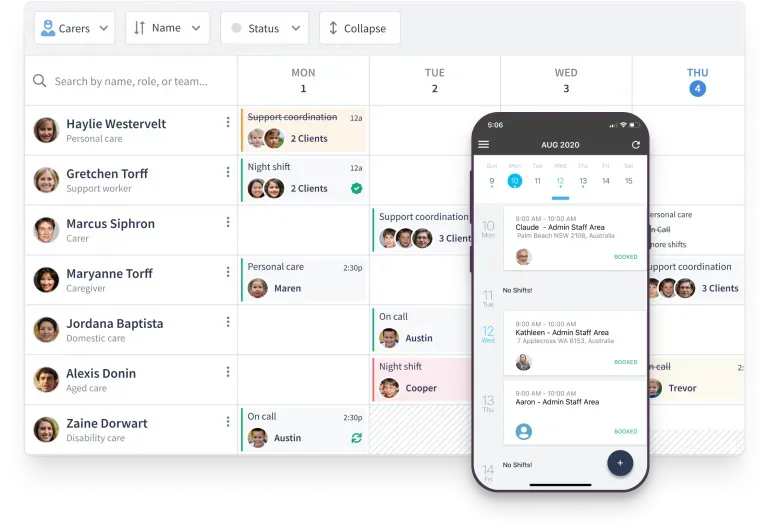
ShiftCare is a care management software designed for NDIS providers, aged care providers, support coordinators, plan managers and allied health professionals. It comes with an array of workforce management, care management, compliance, and business management features.
The software consistently maintains a 4.8/5 star rating, thanks in part to its:
-
Client care features:
With ShiftCare, you can upload clients’ care plans, set their care goals and strategies, and monitor progress towards them. Your clients can also log onto ShiftCare Connect to request their preferred support workers and carers. And, with real-time funds monitoring, you can make sure that your clients’ care is always on track.
-
NDIS integrations:
ShiftCare takes the stress out of NDIS services. It comes with a built-in NDIS Price Guide, auto-generated bulk invoices for NDIS claims and the digital records you need to be NDIS audit-ready
-
Companion apps:
Your caregivers and support workers can use the ShiftCare mobile app not just to clock in and record expenses, but also to view client details, add progress notes, create incident reports, collect client digital signatures and more. Plus, the ShiftCare Connect portal allows clients’ loved ones to receive updates for greater peace of mind.
What are the differences?
| Feature | Bright HR | ShiftCare |
|---|---|---|
| Country | UK, Ireland, Australia, New Zealand and Canada | Australia |
| Price | From $12/user | From $8 user / month |
| Free Trial | 7-day free trial | |
| Minimum Contract Length | 12 months | None |
| Set-up fee | ? | Free self-onboarding; paid packages also available |
| Rostering | ||
| Staff Bidding on Open Shifts | ||
| Geo-Verified Time Tracking | ||
| Real-Time Alerts for Shift No-Shows | ||
| NDIS Price Guide | ||
| Staff Document Management | ||
| Client Document Management | ||
| Client Funds Management | ||
| Client Goals Tracking | ||
| Custom Forms | ||
| Health and Safety Document Templates | ||
| Incident Management Forms | ||
| Recruitment Hub | ||
| Redundancy Tool | ||
| Invoicing | ||
| NDIS Bulk Claims | ||
| Accounting and Payroll Integrations | ||
| Live Customer Support Chat | ||
| Staff Mobile App | ||
| Portal for Clients and Their Loved Ones |
Disclaimer: This comparison is based on publicly available information and customer feedback as of June, 2024. All comparative statements are intended to be truthful, accurate, and evidence-based. ShiftCare has no affiliation with or endorsement from BrightHR. Their name is used strictly for comparative purposes. If you represent BrightHR and believe any information presented here is inaccurate or misleading, please contact us, we’re open to feedback and will review any substantiated concerns.
For a detailed overview of ShiftCare plans and pricing, please see our pricing page.
Should Your Care Business Choose BrightHR or ShiftCare?
Here at ShiftCare, we believe in our care management software. But, we also know that picking the right software comes down to identifying which one will best suit your business needs. Both BrightHR and ShiftCare will help you roster your workforce, track hours and manage staff documents. However, there are significant differences between the two platforms, so you should choose carefully.
Unlike ShiftCare, BrightHR has redundancy and recruitment tools, plus a health and safety software add-on. It’s designed to handle additional steps of the employee life cycle. ShiftCare, meanwhile, offers care-specific features including support plans, goals tracking, progress notes and a client-facing portal. It comes with NDIS integrations like the NDIS Price Guide and bulk invoicing.
To use BrightHR, you’ll need to book a demo with their sales team and then sign up for either a 12-month or 36-month term.
Getting started with ShiftCare is easy, whether you’re transitioning to a new care management software or using software for the first time. You can choose an onboarding package or simply download the app and start setting up your workspace. There’s no minimum contract length.

FAQs
What is BrightHR used for?
BrightHR is cloud-based HR software that helps businesses manage employee records, leave requests, attendance, shift planning, and HR documentation. It also offers optional health and safety tools for workplace compliance.
Is BrightHR suitable for NDIS providers?
BrightHR can help NDIS providers manage HR tasks such as leave, employee records, and attendance. Providers that also need participant management, care plans, and NDIS claiming may compare it with dedicated care management software.
Does BrightHR include health and safety management?
Yes, BrightHR offers health and safety features, including risk assessments, policy templates, and compliance tools as part of its broader HR platform.
Can BrightHR manage employee leave and absences?
Yes, BrightHR allows employees to request leave digitally while managers can review, approve, and track absences from a central dashboard.
Does BrightHR help with HR compliance?
Yes, BrightHR provides document management, HR record keeping, and compliance resources to help businesses manage employment-related obligations.
Is BrightHR designed specifically for care providers?
No, BrightHR is a general HR platform used across many industries. Care providers often compare it with software built specifically for disability, aged care, or home care operations.
Does BrightHR support employee document storage?
Yes, BrightHR lets businesses securely store employment contracts, policies, certificates, and other HR documents in one place.
Can BrightHR track employee working hours?
Yes, BrightHR includes time and attendance tools that allow businesses to record employee hours, manage timesheets, and monitor attendance.
Who is BrightHR best suited for?
BrightHR is commonly used by small and medium-sized businesses that want to streamline HR administration, attendance management, leave tracking, and compliance processes.
What should care providers compare besides HR features?
When evaluating software, care providers should compare rostering, client management, care documentation, compliance tools, invoicing, payroll integrations, reporting, and workforce management.