- Transport & Mileage
NDIS mileage tracking, fully automated.
ShiftCare already knows your roster, your participants, and their funding. Every trip is GPS-verified, correctly allocated, and billed, without a spreadsheet in sight.
Trusted by 7,000+ care providers across AU, US, CA & UK





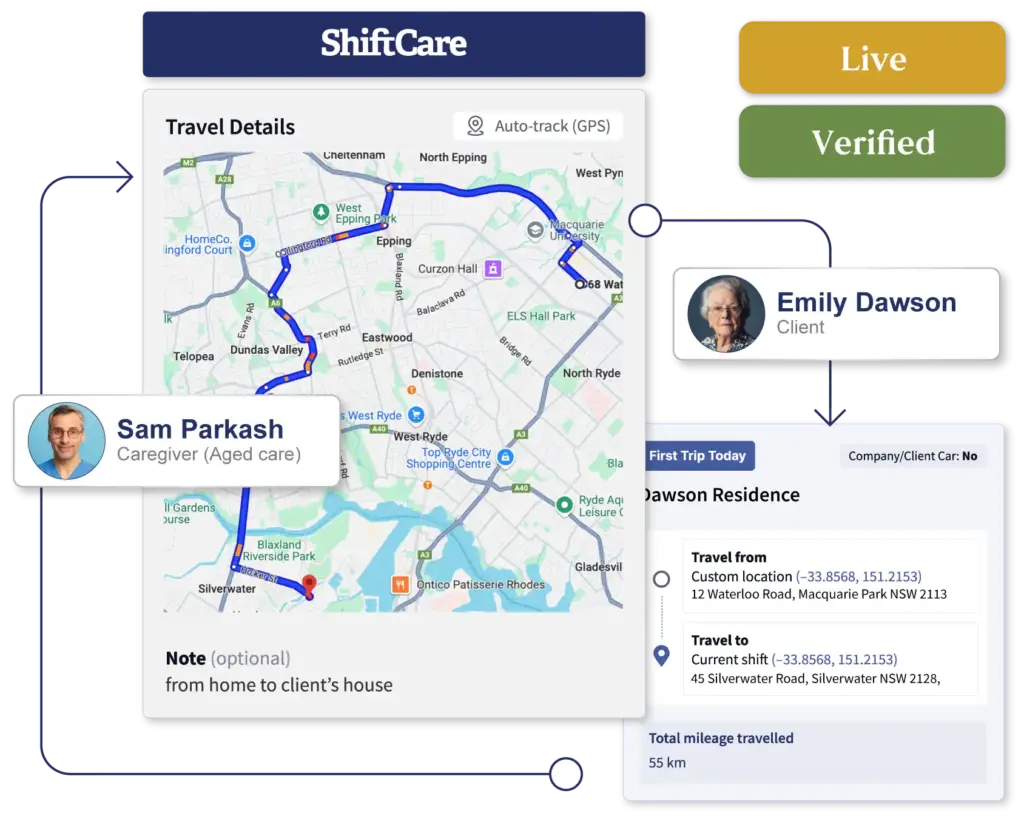

From route to reimbursement, without the admin.
Capture - automatic, before the door opens
One tap. GPS records route, distance, and duration in the background, workers focus on the shift ahead.
Allocate - vehicle type sets the rule
Personal or company vehicle, the correct SCHADS allowance or fleet rule is applied automatically, every shift.
Bill - GPS distance flows into NDIS invoices
Enable the toggle and verified travel mileage populates the claim automatically, zero manual entry for your billing team.
Audit - every trip timestamped and defensible
GPS-verified records ready to export the moment your NDIS auditor asks, with nothing to prepare.
TO-SHIFT & IN-SHIFT TRAVEL
Every in-shift trip. Right vehicle, right allowance.
Whether it’s a to-shift run, a day program pickup, or transport between community access stops, every kilometre is captured, categorised, and correctly allocated, automatically.
Personal or company vehicle - worker's choice
Vehicle type remembered from last time, the correct allowance applied shift after shift, without admin intervention.
Unlimited in-shift trips
Every stop, every leg, every kilometre, captured and linked to the shift record, no matter how many trips the day involves.
Smart clock-out prompt
Workers with a shift within 60 minutes are automatically prompted to start tracking, right data captured every time.
GPS-verified distance, every time
Every distance verified by GPS, every claim holds up, every allowance is exactly right.
We used to spend hours each fortnight reconciling mileage claims. With ShiftCare, the GPS data is just there, workers can’t over-claim and we’re not under-paying anyone. It’s taken a whole admin headache off the table.
Sarah M.
Operations Manager, NDIS Provider (NSW)

ADMIN VISIBILITY
Transport spend visible. Overruns prevented before they happen.
Every trip, every vehicle, and every mileage allocation visible before a dollar moves, so your team reviews and approves from clean, flagged data, not a spreadsheet.
Trips tab inside every shift drawer
All trips, to-shift and in-shift, visible in one click, with distance, duration, and vehicle type.
Client mileage cap variance at a glance
Transport spend shown against each participant's agreed cap, group shifts flagged automatically so overruns don't reach the invoice.
Automatic anomaly flags on the timesheet
Vehicle mismatches surface as colour-coded flags, your team sees exactly what happened without reviewing a single record manually.
Override, adjust, and approve before payroll
Full override control from the shift drawer, every record exact before payroll locks.
BILLING & PAYROLL
From GPS trip to NDIS invoice, automatically.
GPS data flows straight into your NDIS invoices and SCHADS payroll, every claim built from verified distance, not memory.
Travel mileage auto-populates into NDIS invoices
Enable the toggle and GPS distance flows straight into the claim, zero manual entry for your billing team.
Payroll-ready SCHADS mileage allowance
The correct allowance is applied automatically based on what the worker drove, clean payroll every fortnight.
Admin override always available
Override vehicle type, distance, or allowance from the shift drawer, records reflect the real world, before payroll runs.
Audit-ready mileage records, built in
Transport evidence timestamped and GPS-verified in every shift, exportable the moment your auditor asks.
We’re claiming transport more accurately now and we’ve caught a few instances where workers were using company vehicles but had personal allowance set. ShiftCare flagged it automatically, we would never have seen that before.
James T.
Finance Manager, Supported Independent Living Provider (VIC)

FLEET & TRANSPORT INTELLIGENCE
Your fleet, always compliant. Every transport cost, accounted for.
Every vehicle registered, assigned, and tracked in one place, the foundation of a transport operation that scales without adding admin.
Register and manage your fleet centrally
Add a vehicle once and it's live in the worker app, expiry dates and maintenance schedules always current.
Compliance reporting with one click
Registration status, expiry, and maintenance schedule, filtered and exported in seconds for insurance, audit, or NDIS registration.
Pre-assign vehicles before shifts start
Set the expected vehicle at shift creation, deviations flag in red automatically, accurate records without anyone having to ask.
Shift-by-shift vehicle usage history
Every transport run logged against each vehicle, real data for maintenance scheduling, insurance, and fleet decisions.
Frequently Asked Questions
What is mileage tracking in care management software?
ShiftCare’s mileage tracking is one layer of a broader transport automation system. GPS-based tracking uses the worker’s mobile device to capture trip distances, routes, and timing automatically, replacing manual odometer readings and paper logbooks. In the NDIS context, this data serves two purposes: NDIS transport claims (billable to the participant’s plan) and SCHADS Award payroll reimbursements (personal vehicle allowance for the worker). Because ShiftCare already holds your roster, participant details, and plan funding context, it can connect GPS-verified travel directly to invoicing and payroll, with the goal of eliminating manual transport administration entirely.
Does ShiftCare's mileage tracking work with both personal and company vehicles?
Yes. ShiftCare supports both personal and company vehicle tracking. Workers select their vehicle type at the start of each trip, personal vehicles are identified by registration number, while company vehicles are selected from a registered fleet dropdown. For personal vehicle use, ShiftCare automatically adds the applicable mileage allowance to the shift payroll calculation. For company vehicles, no personal allowance is applied. Admins can pre-assign an expected vehicle type to a shift; if the worker uses a different vehicle, the timesheet flags the variance automatically so it can be reviewed before payroll runs.
Can NDIS providers claim transport mileage through ShiftCare?
ShiftCare can auto-populate GPS-verified travel mileage directly into NDIS invoices when billing conditions are met. If the “Add to-shift mileage from carer travel” toggle is enabled and the worker’s to-shift travel falls within the configured travel threshold, the distance is automatically included in the billable line item.
How does ShiftCare handle transport for group shifts and day programs?
For group shifts, ShiftCare calculates billable distance per participant based on shift mileage totals and relevant allocation ratios. A group shift icon in the timesheet view indicates when multiple participants are involved, and cap warning indicators surface any participant who has exceeded their transport budget, so admins can review and correct before invoices go out.
Does the mileage tracking feature work offline?
ShiftCare’s GPS mileage tracking runs through the mobile app and uses the device’s built-in location services. As long as GPS is enabled on the worker’s device, tracking can occur even in areas with intermittent mobile data coverage, trip data is synced to the platform once connectivity is restored.
Can admins view and edit mileage records after a shift?
Yes. Admins can view all trip data from the shift drawer’s Trips tab, including route, distance, vehicle type, and notes. If adjustments are needed, admins can override vehicle type, adjust mileage allowances, and update invoice settings directly from the shift drawer before payroll or billing is processed.
SmartMatch Rostering
AI-assisted rostering that matches the right support worker to every shift, every time.
NDIS Invoicing
Generate compliant NDIS invoices automatically and submit claims direct to the NDIA via PACE.
Support Worker App
A 4.8-star rated app that handles clock-ins, progress notes, mileage, and incident reporting in one place.