- Support at Home
Support at Home Software for Aged Care Providers in Australia
ShiftCare is a Support at Home software platform designed for Australian aged care providers.
Manage rostering, funding, care delivery, compliance, and reporting under the new Support at Home program, all in one system.
Try for free – no credit card required!







Be Ready for Support at Home with Provider-Grade Software
Software Tools to Manage Funding and Invoicing
Manage multiple funding types, track services, and stay on top of invoices and compliance all in one place.
Support at Home Funding & Budget Tracking Software
Manage available funds and balances across different funding options.
Support at Home Compliance & Reporting Software
No more spreadsheets. ShiftCare makes it easy to handle finances, service tracking and pricing with ready-to-use tools.
Scalable Support at Home Service Delivery for Providers
Deliver personal care at scale with automated scheduling, compliance, and documentation tools.
Simplify Aged Care fund management
Invoice clients for the right fees and co-contributions
Bulk claim Support at Home subsidies
Accurately manage participant classifications, co-contributions and pricing rules across all funding levels
Generate activity statements and pricing lists using preloaded templates
Use funding insights to plan and improve care delivery
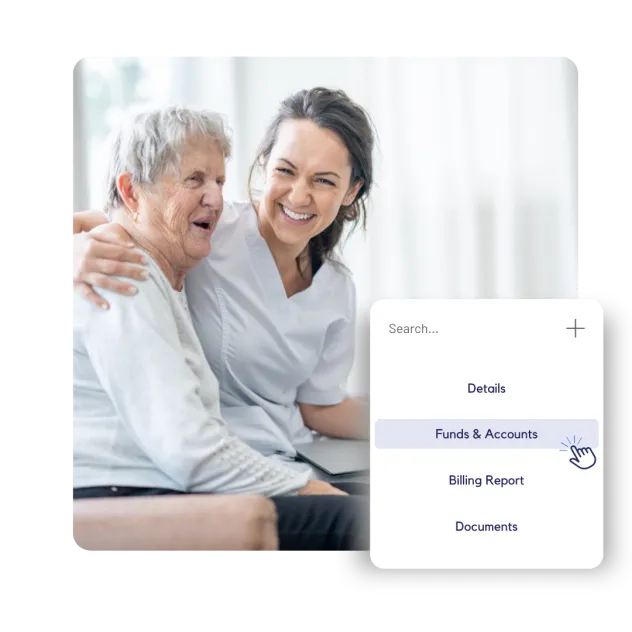

Support at Home Software Features Built for Aged Care Providers
Auto-generate pricing lists with built-in Support at Home service codes
Manage care management minutes and activities
Bulk claim Support at Home subsidies using provider-ready software
Automate Support at Home statements to meet Aged Care Act compliance requirements
Invoice client co-contributions under Support at Home pricing rules
Support at Home Resources for Aged Care Providers

Get Started with Support at Home Software Today
Support at Home Software – Frequently Asked Questions
What is Support at Home software?
Support at Home software is a digital system that helps aged care providers manage care delivery, funding, compliance, and reporting under Australia’s new Support at Home program.
With ShiftCare, providers can manage client care plans, rostering, budgets, co-contributions, and documentation in one place, without relying on spreadsheets or disconnected tools. The software is designed to support day-to-day operations while ensuring providers are prepared for audits, reporting requirements, and ongoing regulatory changes.
Who needs Support at Home software?
Support at Home software is designed for Australian aged care providers delivering in-home services under the new Support at Home model.
This includes:
- Small and medium home care providers transitioning from HCP or STRC
- Multi-site or growing providers managing complex rosters and budgets
- Providers who want to reduce admin workload and compliance risk
- Teams preparing for the New Aged Care Act and ongoing reporting obligations
If your organisation delivers care at home and needs to manage funding, staff, clients, and compliance efficiently, Support at Home software becomes essential, not optional.
What software do aged care providers need for Support at Home?
Aged care providers need software that goes beyond basic scheduling or invoicing.
For Support at Home, providers require a system that can:
- Manage client care plans and care management activities
- Track funding, budgets, and co-contributions accurately
- Support compliant invoicing and subsidy claims
- Handle rostering and mobile care delivery
- Generate reports aligned with Support at Home and Aged Care Act requirements
ShiftCare brings these capabilities together in a single platform, purpose-built to support providers as the aged care system transitions to the new model.
How does Support at Home software support compliance and reporting?
Support at Home software helps providers stay compliant by embedding reporting and documentation requirements directly into everyday workflows.
ShiftCare supports compliance by:
- Tracking care activities and care management minutes
- Managing pricing, co-contributions, and funding classifications
- Generating activity statements and client invoices
- Supporting bulk subsidy claims and reporting workflows
- Reducing manual errors that commonly occur with spreadsheets
By centralising data and automating key processes, providers can prepare for audits with confidence and spend less time chasing paperwork.
Can Support at Home software replace spreadsheets and legacy systems?
Yes. One of the main benefits of Support at Home software is replacing spreadsheets, paper records, and outdated systems that increase compliance risk.
ShiftCare replaces spreadsheets by:
- Centralising client, funding, and care data
- Automating calculations for budgets and co-contributions
- Reducing duplication across systems
- Providing real-time visibility across teams and services
For many providers, moving to a single platform like ShiftCare significantly reduces administrative workload while improving accuracy, transparency, and readiness for the Support at Home transition.
What is the Support at Home program?
When does the Support at Home program start?
The program starts on 1 November 2025.
What’s changing in aged care packages in 2025?
The existing Home Care Packages and Short-Term Restorative Care programmes will be replaced with the new Support at Home model to streamline services and improve outcomes. Key changes include the removal of package management fees and basic daily fees, replaced with a care management funding pool.
Clients will also be limited to rolling over a maximum of $1,000 or 10% of their quarterly budget each quarter, whichever is greater. Government subsidies will now primarily fund clinical care services. Clients won’t pay for clinical treatments, but they’ll contribute more towards independence and everyday living services such as cleaning, transport, and social support.
Providers should adjust pricing models to reflect these changes and avoid shortfalls. The new model also introduces three client types (i.e., new, transitional, and grandfathered) and eight funding levels, with four additional levels for grandfathered clients.
What are the key features of the Support at Home program?
How is ShiftCare set up to support this change?
What is ShiftCare doing to help prepare for the New Aged Care Act 2025?
How can home care providers prepare for Support at Home?
Is ShiftCare ready for the November 2025 rollout?
Yes, ShiftCare is actively working with providers and continues to update its platform to meet all Support at Home compliance and reporting needs.
Start your 7-day free trial
We’re confident you’ll see the value in ShiftCare as soon as you start using it. To see the difference it makes for yourself, sign up for a free 7 day trial.
How many staff do you have?
Staff = admins + care workers
All of our plans fees start with a minimum of 5 staff.
Basic
$9.00
per user
45.00
per month
Month to month
- ShiftCare Mobile App
- Staff Rostering
- Submit Progress Notes
- Manage Team Availability
- Time & Attendance
- Reporting
- Document Management
Most popular
Professional
$15.00
per user
475.00
per month
Month to month
- Everything Basic Plus
- Invoicing
- Job Board
- Advanced Staff Rostering
- Dashboards
- Accounting, Payroll, and HR Software Integrations
- Messaging
Premium
$25.00
per user
125.00
per month
Month to month
- Everything Professional plus
- Custom Forms
- Advanced Incident Management
- Client Signatures
- Client Funds Management
- Awards Alerts in Scheduler (SCHADS)
- Quotes
Basic
$8.00
per user
40.00
per month
Billed yearly
- ShiftCare Mobile App
- Staff Rostering
- Submit Progress Notes
- Manage Team Availability
- Time & Attendance
- Reporting
- Document Management
Most popular
Professional
$13.00
per user
65.00
per month
Billed yearly
- Everything Basic Plus
- Invoicing
- Job Board
- Advanced Staff Rostering
- Dashboards
- Accounting, Payroll, and HR Software Integrations
- Messaging
Premium
$20.00
per user
100.00
per month
Billed yearly
- Everything Professional plus
- Custom Forms
- Advanced Incident Management
- Client Signatures
- Client Funds Management
- Awards Alerts in Scheduler (SCHADS)
- Quotes